Your OS handles the basics. Xenegade handles everything else.
An AI-enabled desktop environment being built for Windows. Not a Windows replacement. Not vaporware. Currently in development — reserve your spot.
$83 one-time or $6/month · Not charged until delivered
Built Different.
Axiom Systems is one person. Just me. No team, no investors, no office with a ping pong table.
I built Xenegade OS because I wanted a desktop environment that actually did what it promised — no greyed-out buttons, no placeholder data, no fake integrations. Every single element connects to a real endpoint. I called that the No-Fakes rule. It took a while. It was worth it.
OS with 47 features that don't work
OS with everything actually functional
Xenegade OS 2.1 Helix
Runs on top of your Windows machine. It doesn't replace your OS — it replaces the chaos of jumping between 15 different apps, 3 AI models, and a browser with 47 tabs open.
AI That Actually Routes Itself
Three AI tiers. Bronze, Silver, Gold. The right model gets picked automatically. You stop copy-pasting between ChatGPT, Claude, and Gemini like it's 2023.
No Fakes. Ever.
Every button works. Every integration connects to a real endpoint. If it's on screen, it does something. Revolutionary concept, apparently.
Embarrassingly Deep
122 integrated apps across webview, OAuth, public API, and API key modes.
Also: it looks really cool.
We're not above admitting that. Dark panels, glowing accents, geometric overlays. It's genuinely nice to look at. Functionality first, aesthetics second — but the aesthetics are very much there.
See It In Action
These are actual screenshots from Xenegade OS 2.1 Helix — not mockups, not renders. The real thing.
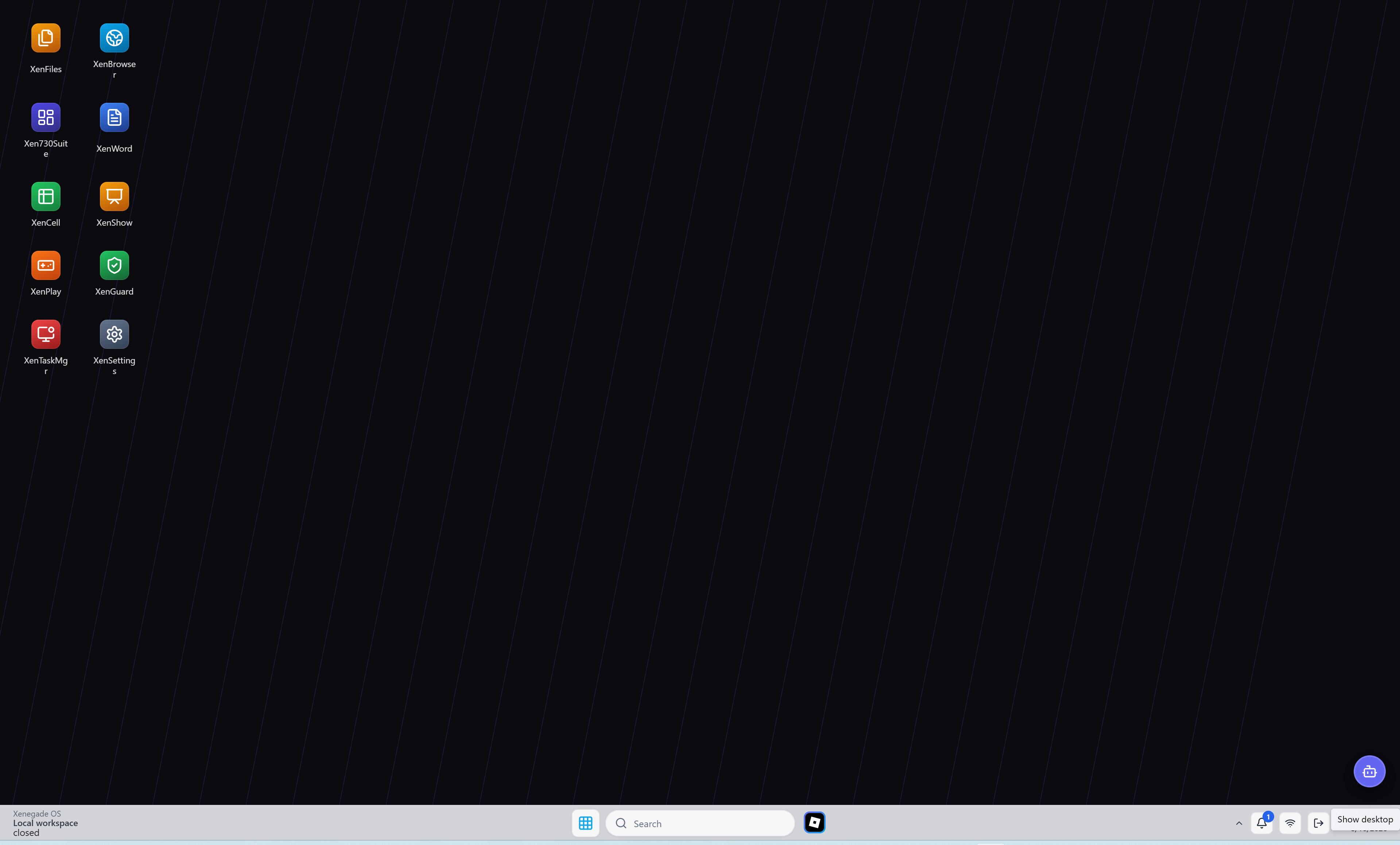
The main desktop environment — dark, clean, and built for power users.
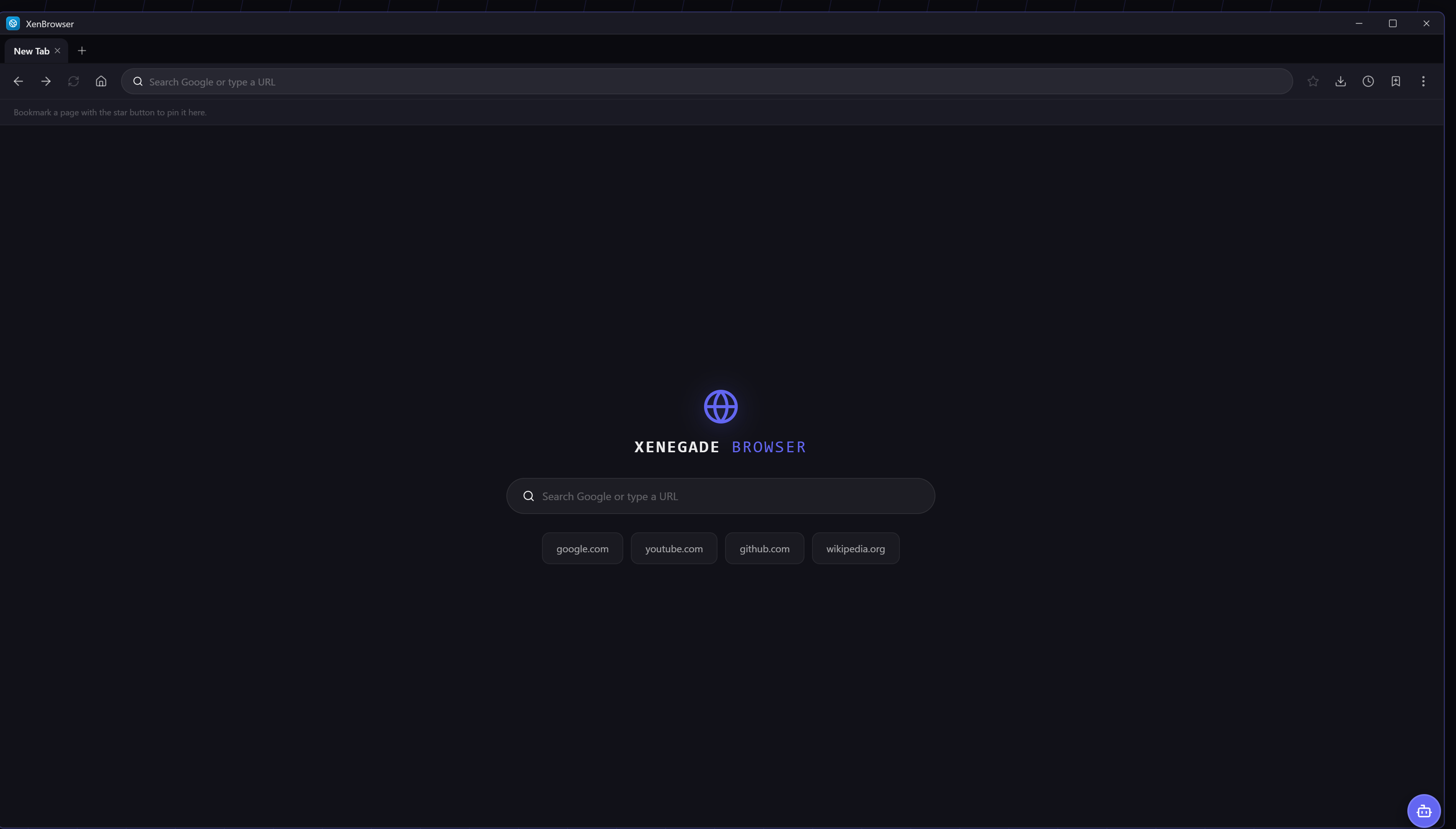
A full browser built right into the OS. No switching windows.
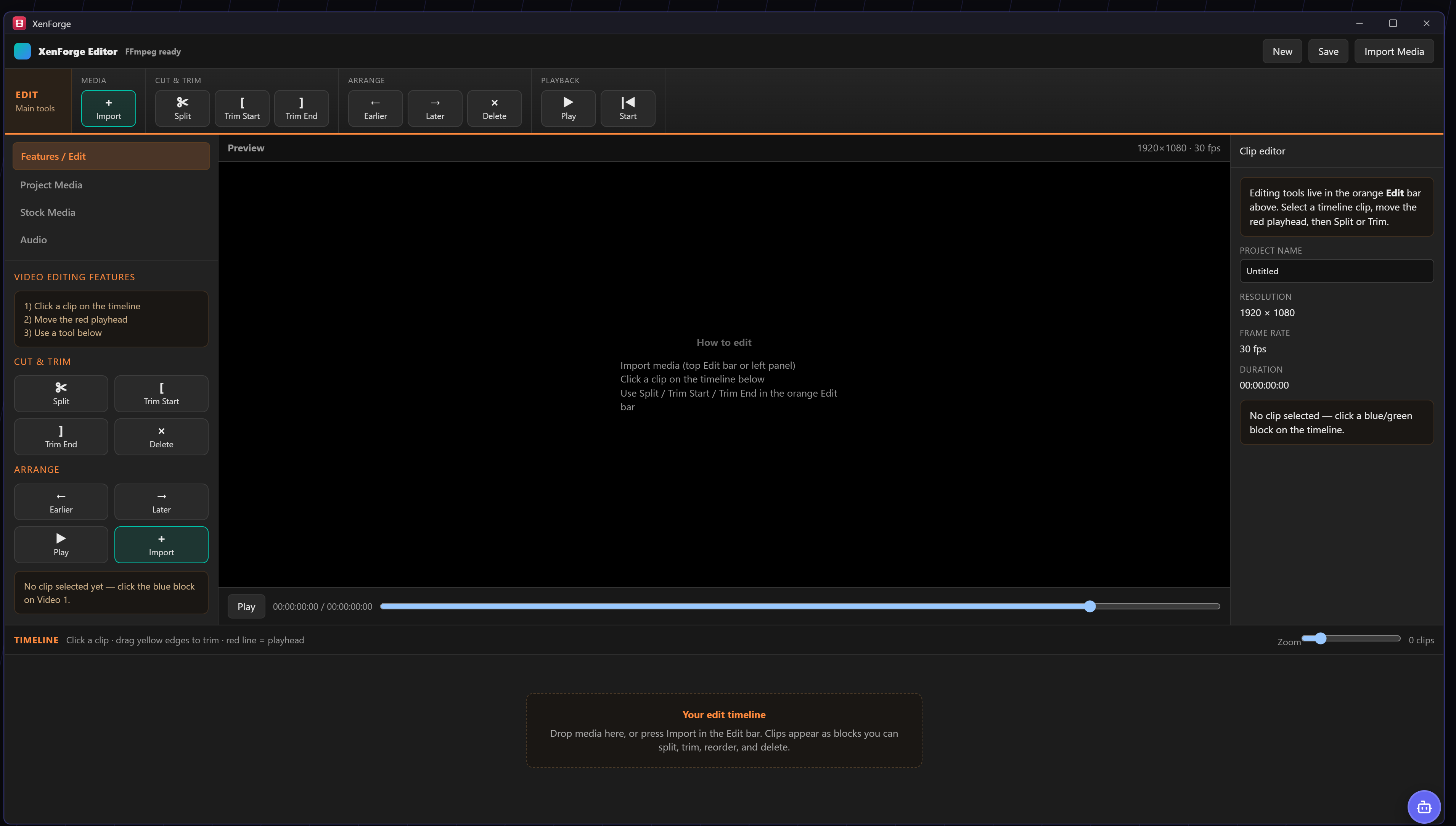
A native video editor. Timeline, preview, tools — all inside Xenegade OS.
How It Stacks Up
One environment vs. the chaos of switching between apps and AI tools.
| Feature | Xenegade OS(In Development) | Switching Between Apps | Single AI Tool |
|---|---|---|---|
| AI Routing (auto) | ✅3 tiers (planned) | ❌Manual | ❌One model |
| All-in-one workspace | ✅Planned | ❌ | ❌ |
| No fake buttons | ✅Always | ❌ | ❌ |
| 122+ planned integrations | ✅Planned | ❌ | ❌ |
| One-time purchase | ✅$83 USD | ✅Free chaos | ❌Subscription |
| AI via cloud providers | ✅Gemini / GPT / Claude | ✅Manual switching | ✅One provider |
The Stack.
Xenegade OS is built on Tauri 2, powered by a React and TypeScript frontend. The Helix AI integration layer routes queries between providers — Bronze (Gemini), Silver (GPT), and Gold (Claude). API keys are stored locally in XenVault and requests go directly from your machine to the chosen provider, with no Axiom intermediary.
What stays local: Your API keys and credentials are stored in XenVault on your device and never transmitted to Axiom Systems servers.
What goes to external providers: AI queries are routed directly from your machine to the provider you select — Bronze (Gemini), Silver (GPT), Gold (Claude). These requests are subject to each provider's privacy policy.
Internet required: AI routing and most integrations require an active internet connection to reach external providers.
Axiom intermediary: Axiom Systems does not operate a server that sits between your machine and the AI providers. Requests go directly from your device to the chosen provider.
Simple. Honest.
All plans give you the same product access. The difference is how you pay and what happens to updates in future major versions.
Reverts to $83 after 3 purchases
Pay once. 1 time purchase. First 3 buyers get it for $58 — then it goes back to $83. Minor updates and bug fixes within this major version included. Future major versions may be a separate purchase per the Terms of Service.
Reserve on WhopEasiest way to get started. Cancel whenever. We won't guilt-trip you. Access continues while your subscription is active.
Reserve on WhopSaves you $14 vs monthly. Access continues while your subscription is active. Maths checks out.
Reserve on WhopXenegade OS is currently in development. All purchases are advance reservations — you are securing your spot before the product launches.
✅ The owner's policy: you will not be charged until the product is delivered and you have been granted access.
Existing subscriptions and payment records are preserved. Any pre-authorisation holds will be released in full if delivery does not occur.
Update policy: Minor updates and bug fixes within the purchased major version are included. Future major versions may require a separate purchase — see our Terms of Service for details.
All prices in USD. Yes we know that's not AUD. It's complicated.
Before You Install — Read This First
When you first run the Xenegade OS installer, Windows may show a 'Windows protected your PC' warning. This is normal for independently published software that has not yet built a broad reputation with Microsoft's SmartScreen system.
Xenegade OS contains no malware, no adware, and no telemetry. Always verify you downloaded from the official Whop store and check the publisher name in the SmartScreen dialog before proceeding.
We are working toward Authenticode code signing. Signing identifies the publisher and helps establish trust with Windows, which can reduce SmartScreen warnings over time. However, warnings may still appear depending on your Windows settings and the software's reputation history — signing alone does not guarantee warnings are permanently eliminated. Learn more about SmartScreen from Microsoft →
So... what do I actually use this for?
Great question. Xenegade OS is a premium workspace layer that runs on top of Windows. Think of it as a second desktop — clean, structured, AI-native, and fully integrated.
For people who use their computer seriously. Developers, AI-heavy workers, power users, and people who just hate how messy their actual desktop has become.
It won't run your games. It won't manage your hardware. It will, however, make everything else significantly less annoying.
What's Next
Xenegade OS is actively being developed. The $6/month subscription funds continued work — here's exactly what's coming.
Frequently Asked Questions
Honest answers. No corporate non-answers.
Get In Touch (Please Use Text. I'm Begging You.)
I'm one person. I don't do phone calls, voice chats, or video meetings. Send me a message and I'll reply in writing, like a normal human on the internet. Response time: usually within 48 hours, sometimes faster if I'm procrastinating on something else.
Shape what we build next
What features should we make?
Have an idea that would make Axiom better? We read every suggestion — drop it in the contact form below.
Built on Real Things
No fake star ratings. No made-up quotes. No invented user names. Just facts.
Reviewed and approved by the Whop marketplace
Listed and verified on Whop — one of the most trusted digital product marketplaces.
Built on Tauri 2
The same framework powering production desktop apps worldwide. Not a toy framework — a serious one.
122 integrations
Every single one connects to a real endpoint. No mock data, no placeholder connections, no illusions.
No-Fakes rule
If it's on screen, it works. Non-negotiable. Every button, panel, and integration is live and functional.